Posts

Hapara Champion Educator

Image
 I have recently completed the Hapara champion educator course. It was a really insightful course into the power of using Hapara workspace for students. Completing the course was not very time consuming and nor was it very hard as I have been using Hapara for some time. However it was an eye opener in the sense that I had never really been shown how effective the workspaces can be and also what the students see when using it. I think that although the visibility as a whole is low, the tracking and effectiveness for teachers to view and manage student work through this system is very useful. It is also something that becomes a great resource bank as you never lose your workspaces and the content can be reused or redesigned each year.

Creating Media then adding in some computations

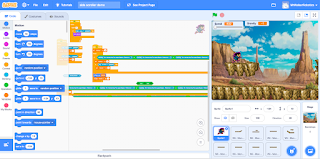
Creating media with kids is always super fun. It also provides the students an opportunity to learn some great skills that can be applied in real life. Building them up to be graphic designers in a world that is always wanting new graphic designs. One of the things I often use is google draw. This tool is great for making some SVG artwork that looks great in websites, posters and other types of media. Recently however I came across this thing in maths called Parallax. " Parallax is the apparent displacement of an object because of a change in the observer's point of view." Google. This triggered an Idea to see if I could make something in scratch that would mimic this idea. So I did a bit of research and found the code is very simple. Along with this using SVG images allows us to import all the different layers in an image which we can then add parallax to to create a sort of 3D movement. It's really cool and can add that little bit of Computational thinking into th...

Google for Education Announcements

 I am currently watching and participating in the Google for education product Training series and wow there are some cool updates coming. Certainly things I would recommend to others and schools to use. Some top of my list currently are Chromeboook app hub Breakout rooms coming to Google Meet The chromebook app hub is great for educators as it provides apps that have been vetted and are made for use in education settings.  This is really cool as it can be a way to explore different apps that may add to your learning without having to go through the privacy and policy notes to see if it is available for kids under 18. This will save a lot of time for educators.

Scratch Cybersmart Challenge Task

Image
 I am currently reworking some of the cybersmart challenge content to develop student and teacher capacity to use scratch as a DLO tool. Below are some of the few I have started with. The focus is around adding sounds and buttons to a scratch project to share information. Students can complete the task, and then record themselves saying the Kawa of care. This could be done as groups or individual, with specific tutoring on the process of adding sound and uploading an image. You could use Remove.bg to get a nice Sprite of the student. https://scratch.mit.edu/projects/552480263 https://scratch.mit.edu/projects/552494638 https://scratch.mit.edu/projects/552746609

Reframing Create

  This post is about coming in as a new facilitator for Manaiakalani and looking and how my experience can fit into what is already happening. Recently I have been shadowing two of our other excellent Facilitators learning the ropes for in class support, along with attending the DFI's in Northland and Auckland. One thing I have found is that the cybersmart programme has many wonderful aspects that can be reframed through alternative tools, this helps provide a new way to create something that may have been done in years prior. A great example of this is creating an about me poster. Usually we would start this in google drawings and use it as a way to learn the tool. Keeping with this same mentality I looked at extending it into computational thinking, by using scratch. Check my demo scratch project and keep updated for some student models. This is ideal for older students who have been working through the cybersmart programme. Also check out some of the other teachers who had a go ...

Your Seriously not considering Youtube!!!

Image
 Is what in my mind must go through every parents head at this time after lock down. With a large majority of students at home potentially "wasting" hours on fortnite videos or rewatching quick laughs like "I like your cut G!" I decided to try and refocus my sessions to be a little more broader in terms of how learning is applied. For my school this year we have a goal of integrating all our math strands into project based learning which will happen all through the year. So gone are my days of happiness and joy at providing only one area of maths learning per term......not! The curtains have finally opened to my dreams of project based math activities that rely on hooking students in with some sort of hands on fun activity that takes weeks/months and encompasses maths in a real setting. I have always stated that maths is my worst area and yet I am being held up as an example for what could be achieved. Look at me now NCEA UNIT STANDARDS MATHS!!!!! Jokes aside here a...

Become an Expert without the degree (or cost)

 I have recently come across and article shared by my colleague which talks about how we have so much access to new learning opportunities via the internet. I for one have always pushed this with my kids because that is exactly how I have managed to build up my content knowledge in a range of areas that were needed at my school. My university education underpins this though and without my actual qualification I would probably not be in the position I am in. Along with this I have to admit being a teacher does give rise to the opportunity to learn the basics of a range of new skills due to having to give your students the opportunity to learn these. An example of this is me taking over the robotics programme for my school. I had no training in robotics or STEM education before I was given the opportunity to run  a whole programme around this area. I had done some basic coding back in College but let's be honest it was more about playing Counterstrike with the boys on the school...

Reflective entry 4: State the research question(s), and explain how the question(s) have been developed and how they relate to a Kaupapa Māori approach to knowledge gathering and community priorities

Image

Reflective entry 3: Demonstrate a critical understanding of how indigenous knowledge and cultural responsiveness inform practice

Image

Reflective entry 2: Discuss how the research topic addresses the context of different audiences (local, including community priorities national and/or international) and their perspectives

Image

Reflective Entry 1: Identify a research topic that is relevant to your area of practice and relates to Digital and Collaborative Learning

Image
Reflective entry on effective communication and collaboration between Teachers to students, to parents.

How can blogging help you with your Communication, Public Relations and Branding as an educator and digital leader?

Blogging can be an effective way to share your professional knowledge and persona with your community and is great for recording professional growth and development however blogging platforms like blogger and wordpress are not the most accessible content creators for most of the community, as I have found through personal experience.  In terms of sharing your brand as a teacher to be effective you need to be accessing the forums that your community access. To this day that would be Instagram and Facebook. Then you would need to make sure your content is appropriate for your audience and ensure it encapsulates the brand of teacher you want to show. I have set myself up with an Instagram page that solely focuses on my STEM development and I use this to share my creations and things that I think my students would engage with. This is part of my brand as a teacher and I make sure that I interact in a way that ensures I maintain critical thinking and a learner focused relationship. ...

Edu 4.0 Future tech & collaboration

Image
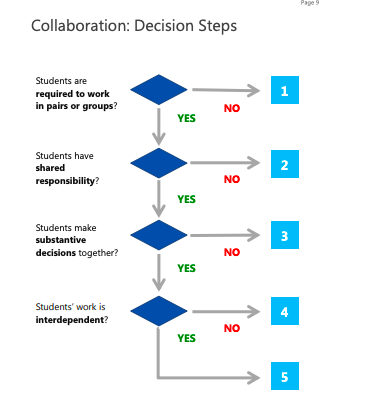
Sitting in a floating ball in the Tech Futures building in Newmarket, Auckland, I find myself thinking about the future of education (mainly because I'm doing the Mindlab post graduate course) and how as teachers we can develop our individual understanding of how to make use of the new digital curriculum and change the way we approach our classroom task design and learning environment. The collaboration flow chart from Microsofts 21C Learning design framework and rubric is a great starting point for most schools and teachers to use to help them redefine collaboration within their classrooms and practise. How many tasks do you provide for your students that would meet level 5? I know I would probably be lucky to get to a level 3 or 4 and I'm the head of Digital at my school! Gives you a strong point to start reflecting on.

2019 and I'm getting there with STEM

Image
2019 has been interesting. This is the year of STEM and the year of heavy learning on my behalf. If you are new to digital teaching, then STEM subjects through a digital medium can seem pretty hardout. You may want to yell NERD!!! at the top of your lungs at anyone who seems vaguely adept at this area. However it is much easier than I had anticipated and basically all I really had to do was spend some of my own time mucking around with the learning tools in order to fully understand what they do. So to help you break down some of those STEM walls I have a few tools I would like to recommend for the inexperienced. Scratch.mit.edu Scratch is a great tool to get kids into coding. However at first it can seem pretty daunting. Luckily for you and me there are some pretty good youtube tutorials to help you get through the basics. Alternatively this online tool also offers mini lessons that can help break down basic commands, like moving a sprite and creating fun games. Scratch is a gre...

Next steps for the Site

So I have had my students have a small play with the website to see if they can access the content and help find any bugs or areas they think should be reworked. This was an interesting process and although I have designed the site to be a 3 click max experience, I still found students might need the site to be less scroll orientated. This presents some issues for me around the amount of content I have and how to get it into a more functional format, but it has made me look at how I can use HTML to add the features I want. Which in itself is a fun learning experience, recently I figured out how to use a carousel and have started looked at other more advanced (to me) functions. After this experience I know I need to look at forming a team to help get the build up to scratch. My next area for work is also around the content and creation. I have tried to make as much content as I can but because of this I feel it is potentially limiting the experience that could be given. I would hate t...

We are live (but not done)

The website is live. I figured I am at a stage where I need to start having people critique and find bugs in my site. So I have opened it up to all who wish to critique. Below you will find a link to the site. If you find any areas you wish for me to have a look at please comment below and I will endeavour to answer your queries and fix any bugs you may find. Just to note however, as this task is monumental in the amount of content I need to create at the moment many of the sites pages do not go beyond the initial landing pages for each subject area. Inferencing is the only one nearly completed and some more may be ready by the time you read this. Please be steadfast in your accusations of lazyness as I am getting there with the content. What I need from you however is to check these few things - Can you access the work (all open to make a copy) - Can you see the videos (nothings wrong there hopefully) - Does the content you think meet the need by level - Are most areas 3 click ma...

Filming has begun!!!

Image
Quick I need some makeup!!!!! just kidding, that won't help.... Filming has begun. When I say filming I mean I have started to create the tutorial videos for some of the key strategies being taught. However some areas I may need to consider - Do I need to get a haircut (Jokes but maybe wear a shirt to look more like a teacher) - Do I need to get a quality mic? I mean its not bad sound but its not great sound -Do I need a high quality video? Screencastify is great and useful but would people prefer quality - Should I script it to the max (Maximum script or more real life) - Should I find other teachers to do tutorials. Would students benefit from having a consistent teacher do the model or have a range of teachers to share their understanding? Food for thought whilst I create the content.

Graphic design process for the website

Image
Enough moaning about content and other such issues. Building websites is still fun! I have always had a passion for a little graphic design and have after receiving a little push from my partner (as she said it looked boring) decided to revamp some of the plainer buttons on my site. I have created all buttons in google drawing and downloaded as pngs to give it a better fit. Most shapes were created using only the basic shapes functions. Check out my results below.

Website content issues!

Image
I don't want to start this post off on a downer but man is it hard to create quality content when under the pressure of time! My first idea for having a group of teachers to help collaborate with over how lessons might be approached and levelled has sort of fallen through. All though many teachers would like to help, no one seems to have the time to really get into it. So I am stuck here trying to create some lessons that will hopefully provide the benefits I so want out of this site. I believe I need the input from others as I feel the more experience and input I receive then the better the results will be. I will continue to endeavour to create and hopefully my content and lessons will be what people are after. My next steps will be to have to find a creative panel who can at least judge the quality of my lessons and provide feedback as to the positives and negatives and the next steps.

Website Progress check

Image
The website is now in its functioning stage with the bare bones being laid out and some of the surface features being added in. It has been fun designing and playing around with how the sight will look and feel. Mostly all content I have had to create by myself so this has taken a little bit of time but hopefully this will add the sites look and feel in a way that makes it standout as a tool. My next step is to get enough content so that I have a working demo. The site won't work well if I haven't got any lessons on it now will it!